
How to track your competitors and see what works for them
Updated November 2, 2026
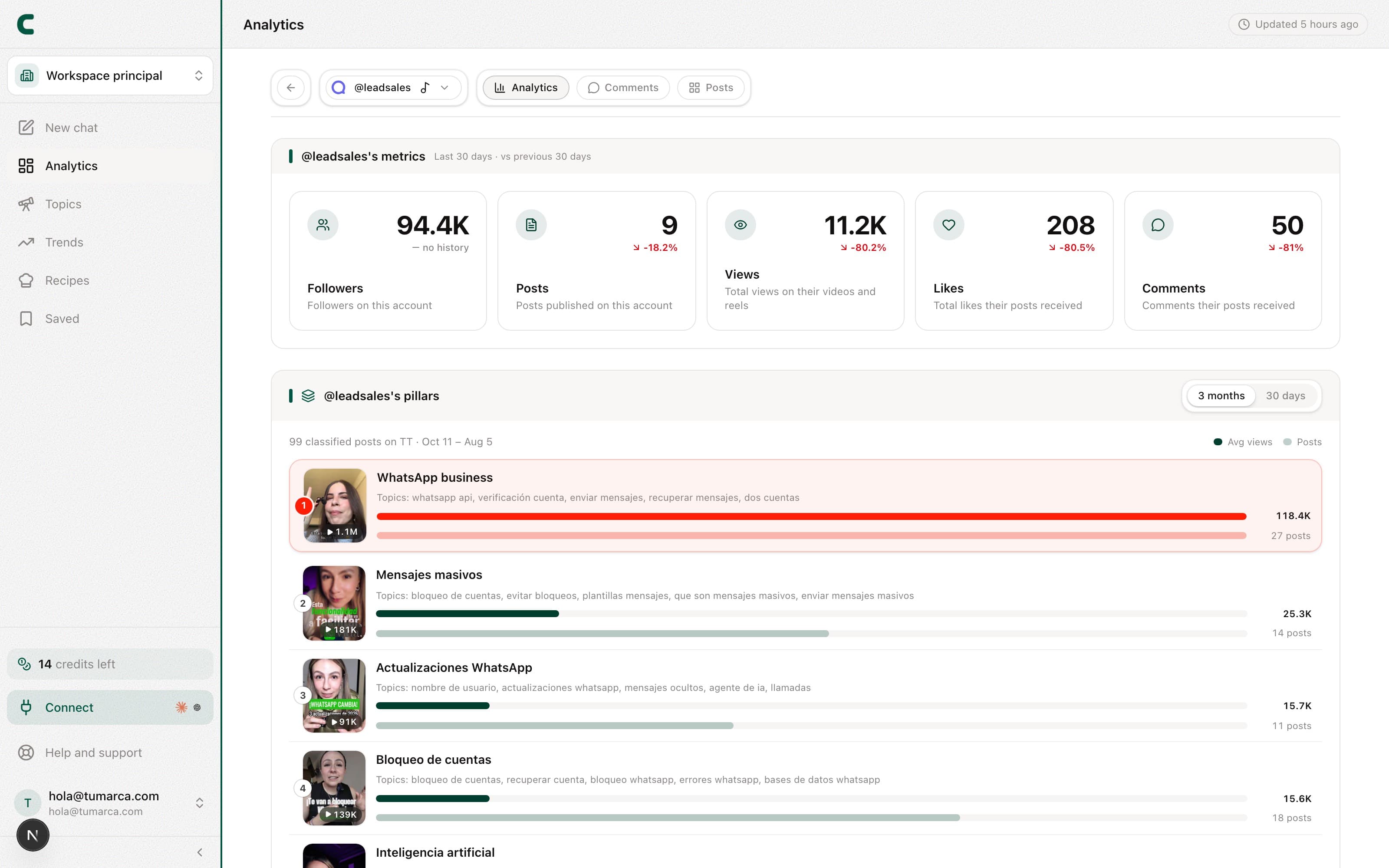
Your competitors live in Tracking, on the Accounts tab: each one gets a row (one per network) in the competitors group of the table, below your accounts, with their followers, avg. views, engagement, top outlier, views per post and latest posts. They also show up in the account switcher, below your own networks. Every competitor gets the same panel your own account does, with the Overview, Comments, Posts and, if it's on Instagram, Ads tabs (the Audit is only for your own accounts).
How to track a competitor
Tap "Track account" › "A competitor" in Tracking
The button sits at the top right of the Accounts tab in Tracking, with its slot counter. The last row of the table also tells you how many slots you have left and opens the same dialog with "Track". You can also add one from the account switcher.
Paste their profile URL
Works with TikTok, Instagram and YouTube accounts.
Wait a few minutes
Their row shows "Queued / analyzing" and their posts arrive within minutes. If you add several accounts at once, their comments can take up to an hour to arrive.
Tap their row
You now have their full panel: what they talk about, how they open their videos, and when they post.
One competitor's analytics
Open their account and you'll see, computed over their real posts:
- Their numbers: recent followers, posts, views, likes and comments.
- Their content pillars: the topics they actually post about, detected automatically.
- Their hooks: how their most-viewed videos open, and which opening performs best for them.
- Their hours, formats and durations: when they post, their photo/video mix, and how long their videos run.
- Their collabs, sponsored posts and mentions from the last 90 days: who they collab with, what Instagram or TikTok marks as sponsored, which sponsorships they disclose in the video and which brands they promote without disclosing it. Hover each post for the details, and compare how they perform against the rest of their posts.
- Their trial reels (Instagram only): the reels they test with non-followers. You turn them on per competitor; see how to see your competitors' trial reels.
- Their posts: the full grid in the Posts tab, with their outliers tagged and filterable tags like Collab, Sponsored, Mention and Trial reel.
- Their comments: what their audience is telling them, in the Comments tab.
An outlier is always measured against its own author's average. A post marked "3x" tripled what's normal for that account, not for yours: that's what makes a small account and a huge one compare fairly.
All your competitors at once
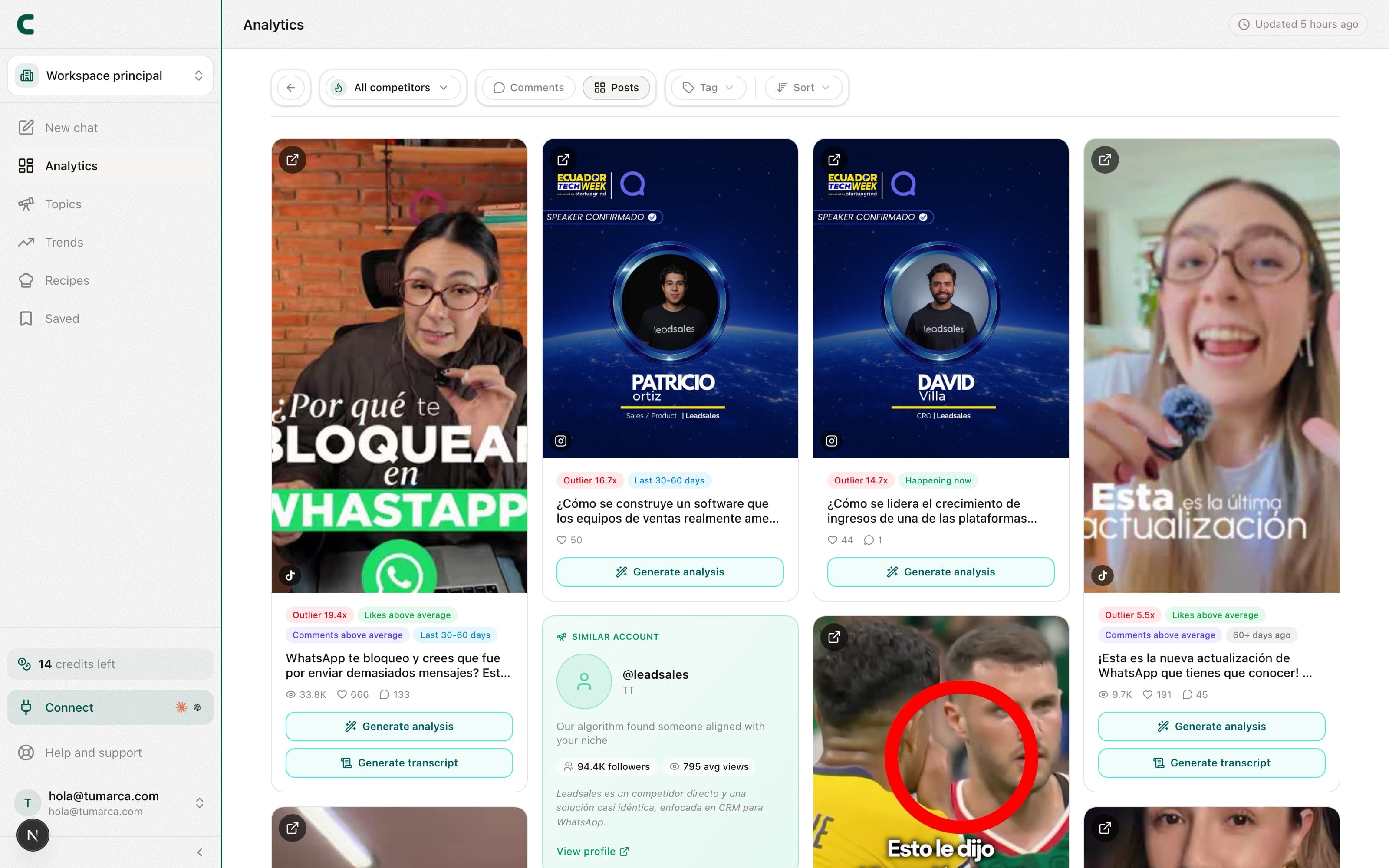
The All your competitors row in the switcher gathers every tracked account's outliers into one grid, ranked by how far each post beat its own account's average. Every card says whose post it is. It's the best starting point: what's breaking out in your niche right now. On any card you can generate the transcript or the full analysis to understand why it worked.
Untracking (and coming back)
From the ⋯ menu on their row you can Stop tracking a competitor: they disappear from your table, your switcher and your views, and their slot frees up right away for another account. If you track them again later, their analytics come back very fast. During the trial period untracking isn't available.
Each plan includes a number of rotations per billing cycle: the times you can stop tracking an account to put another in its place. Basic 2, Pro 4, Ultra 8. They reset every month on your billing date. Fixing the username of an account we can't find doesn't count as a rotation.
Your plan includes a number of tracked accounts across your own and your competitors', split however you like as long as one of each remains; the counter next to the buttons tells you how many slots you're using, and it's a single one for own accounts and competitors. When they're full, the dialog points you to Subscription, where you can see your exact slots and buy extra slots: each one adds 1 account.
Frequently asked questions
How often does it refresh?
We collect their posts every 24 hours, and their pillars and hooks are analyzed nightly. When you add a new competitor, their posts arrive within minutes and their panel completes over the first day.
I added a competitor and their comments are empty.
Posts arrive within minutes, but comments and sentiment are picked up by a process that runs every hour. When you add several accounts in a burst, they can take up to an hour to appear.
Why doesn't a competitor have an Audit?
The Audit evaluates your profile and your execution to help you improve, so it only exists on your own accounts. On a competitor you get Overview, Comments, Posts and, if it's on Instagram, Ads.
What's an outlier?
A post that performed well above its own author's average: the signal that a format or angle landed especially well.
Can I ask Scouty to do it?
Yes: ask it in the chat to "track @account as a competitor" or "stop tracking @account" and it shows you a card; nothing changes until you confirm it. See what Scouty can do for you.
Was this article helpful?
Related articles
- How to see your competitors' trial reelsSee which reels an Instagram competitor tests only with non-followers, and which ones they end up sharing with their followers. Turn it on from the ⋯ menu on their row in Tracking.
- How to see your competitors' Meta adsSee which ads an Instagram account you track pays for on Facebook and Instagram: which ones work for them, what they're testing and which posts they turned into ads. It comes with the Pro and Ultra plans and you turn it on from Tracking.
- How to unlock a post's transcript and analysisTurn any outlier or post you're researching into a lesson: pull its transcript or break down why it worked. Each unlock is charged in credits once and stays yours forever.
- How to read your Tracking dashboardTracking opens on the table of your accounts and competitors. Tap any row and you get that account's full overview: metrics, pillars, hooks, posts and comments.
- How to add more competitors or networks with extra slotsYour plan includes a number of slots for tracked accounts that you split however you want. Extra slots add to it: you buy them in Subscription and they get used on their own when you track one more account.
Didn't find what you were looking for?
Reach us from the app via the Help button at the bottom of the menu and we'll reply by email.