
How to explore your posts
Updated October 17, 2026
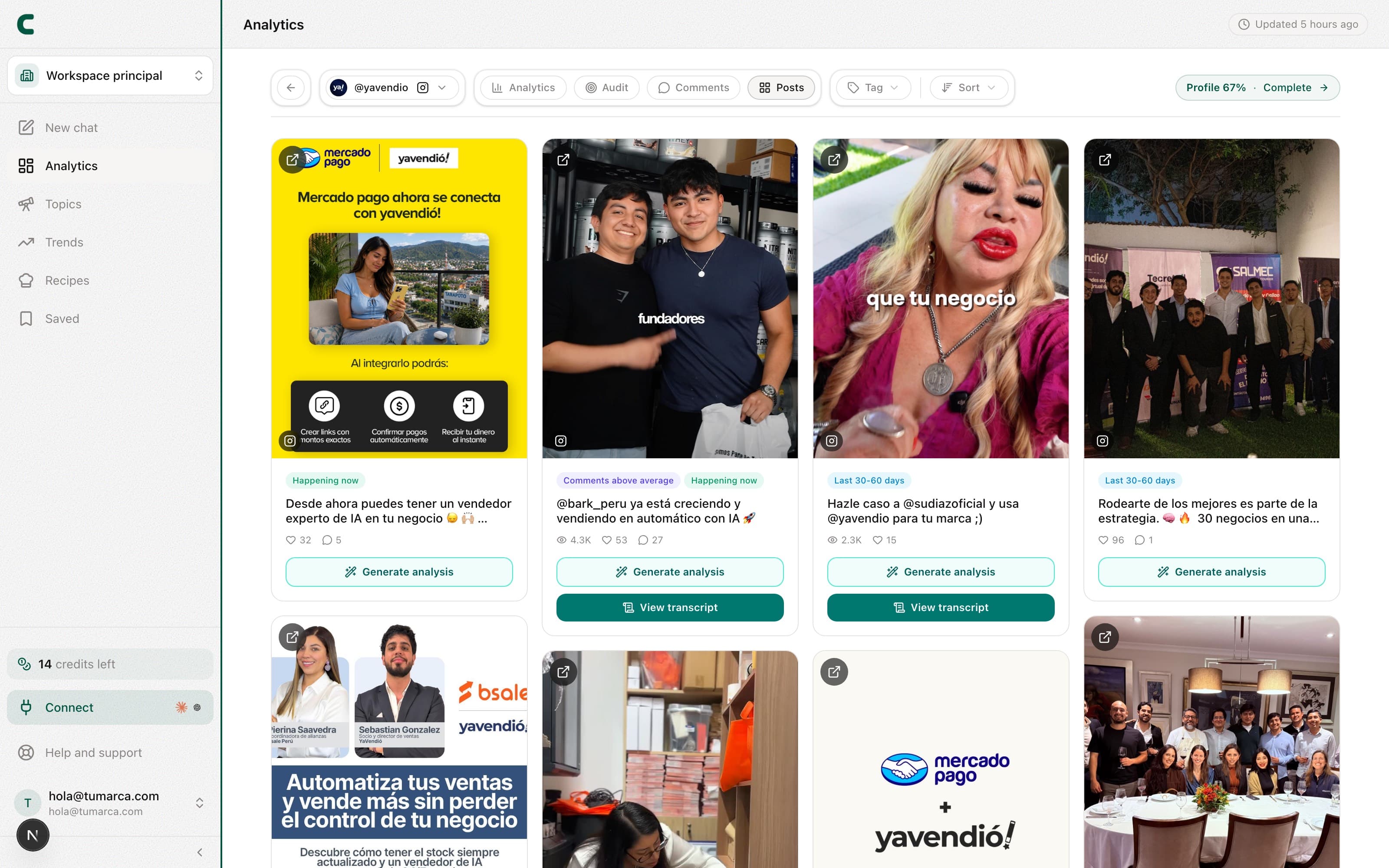
Posts is one of each account's tabs in Tracking: open an account from the table on the Accounts tab and pick it next to Overview and Comments. It's the full grid of what that account published, with tags that tell you at a glance what performed. It works the same on your accounts and on your competitors.
Filter and open a post
Enter an account
On the Accounts tab in Tracking, tap the account's row and pick the Posts tab.
Filter by tag
Keep only the posts that stood out, or those in a given age range.
Sort the grid
From most recent (the default) to most views, top outliers, most likes or most comments.
Open a post's detail
Tap any post to open its detail dialog, with its metrics and the options to go deeper.
What the tags mean
Every card carries color tags. They're always measured against the account's own average on that network, nobody else's:
- Outlier: the post performed well above the account's average. The number shows how many times it beat it, so a 3x means it tripled the typical post.
- Likes above average: it got more likes than normal, even if its reach was ordinary.
- Comments above average: it sparked more conversation than usual. That's the sign a topic struck a nerve, even when it wasn't the most-viewed post.
- Happening now, Last 30-60 days and 60+ days ago: how recent the post is.
Videos are compared by views and photos by likes, always against that same account's median. That's why the same kind of post can be an outlier on one network and not on another.
Go deeper on a post
Every post carries two buttons to understand it better, and both are charged in credits only once:
- Transcript: pulls the video's spoken text. It only exists on video posts: a photo has nothing to transcribe, so you won't see the button.
- Generate analysis: breaks down why the post performed and what you can learn from it.
Each unlock is charged once and stays saved: you can re-open that post's transcript or analysis without paying again.
Why does a post have no transcript button?
Photo posts have no transcript. And if a video is music-only or has no speech, there's nothing to transcribe; when that's the case, we let you know.
I added an account and its Posts view is empty.
A new account's posts arrive within minutes of adding it. In the meantime you'll see an honest empty state, with Scouty inviting you to generate ideas in the chat while it fills in.
Why does an older post have no performance tag?
We compare against the account's last 90 days, the same window its analysis uses. An older post keeps its recency tag, but it no longer takes part in the comparison.
Was this article helpful?
Related articles
- How to read the "Your hooks" box"Your hooks" ranks the top 5 hook types of the account you're viewing, measured against its own median. Drill into any of them to see the example posts.
- How to track your competitors and see what works for themTrack competitors from the Tracking table and each one gets its own full analytics: their pillars, hooks, posts and comments. And an all-competitors view shows you just their outliers.
- How the free days, plans, and credits workUnderstand what your 5 free days include, which actions use credits (analyses and transcripts; the chat and outlines don't), and where to watch your balance.
Didn't find what you were looking for?
Reach us from the app via the Help button at the bottom of the menu and we'll reply by email.